
Choose length
Aim for at least 15 characters when a password is your only sign-in factor.

Use long, unique passwords and multi-factor authentication to protect your hosting, website and email accounts.
Practical steps for safer hosting and email accounts
Aim for at least 15 characters when a password is your only sign-in factor.
Use a password manager and a different password for every account.
Enable multi-factor authentication wherever the service supports it.
A compromised hosting account can be used to alter your website, redirect visitors or distribute malware. A compromised email account can be used to send spam and damage your mail reputation. Strong, unique passwords help protect both your business and your visitors.
Use a password manager to generate and store a different password for every account. Aim for at least 15 characters, especially when a password is your only sign-in factor. A long passphrase made from several randomly chosen, unrelated words is another option where the service supports it.
Avoid personal information, common phrases, predictable sequences and small variations of old passwords. Replacing “a” with “@” does not make a predictable password safe. Never use a published example password.
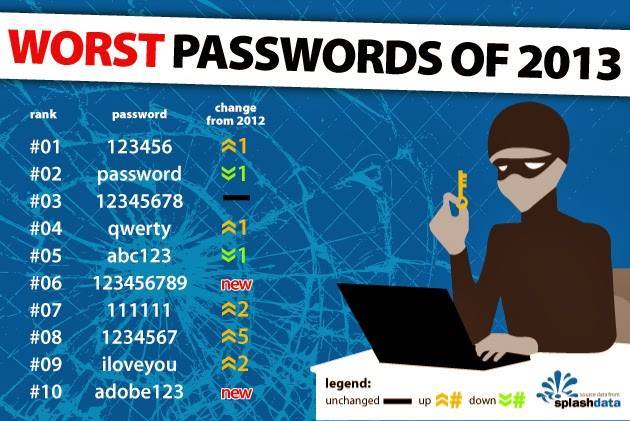
Change it immediately if you suspect exposure, reuse or unauthorized access. Routine scheduled changes are not a substitute for a strong, unique password. If an account is compromised, also review active sessions, recovery settings and multi-factor authentication, and contact support.
No password can guarantee complete security. Use these measures together.
Guidance reviewed November 2026 against NIST Digital Identity Guidelines. This updates the older article’s eight-character examples and routine password-change advice.
Change any exposed password and contact support. Do not submit passwords through a support form.